
Download DVD Smith Movie Backup – DVD Backup, Movie Archiving, Digital Copy, Secure Copy, Windows Utility
Overview
DVD Smith Movie Backup is a Windows-based utility designed to help users preserve their physical DVD collections by creating digital backups. The application focuses on removing common DVD copy protections such as CSS, RC, and Sony Arcos, enabling users to copy both full discs and just the main feature of a movie. This functionality is particularly useful for individuals seeking to safeguard their media from physical damage, loss, or obsolescence.
The tool targets home users, collectors, and digital archivists who value long-term access to their film libraries. Although the developer’s background is not disclosed in the provided information, the app’s purpose is clearly defined: to simplify the process of backing up DVDs with minimal technical involvement. Real-world use cases include digitizing a personal movie library, preserving rare or out-of-print titles, and enabling playback on modern devices that no longer support optical drives.
In the broader context of digital media management, DVD Smith Movie Backup fills a niche role in the utility category by offering a straightforward solution for legacy content migration. Despite the rise of streaming services, many users still maintain physical DVD collections, and this tool provides a practical bridge between analog media and modern digital storage.
Key Features & Functionality
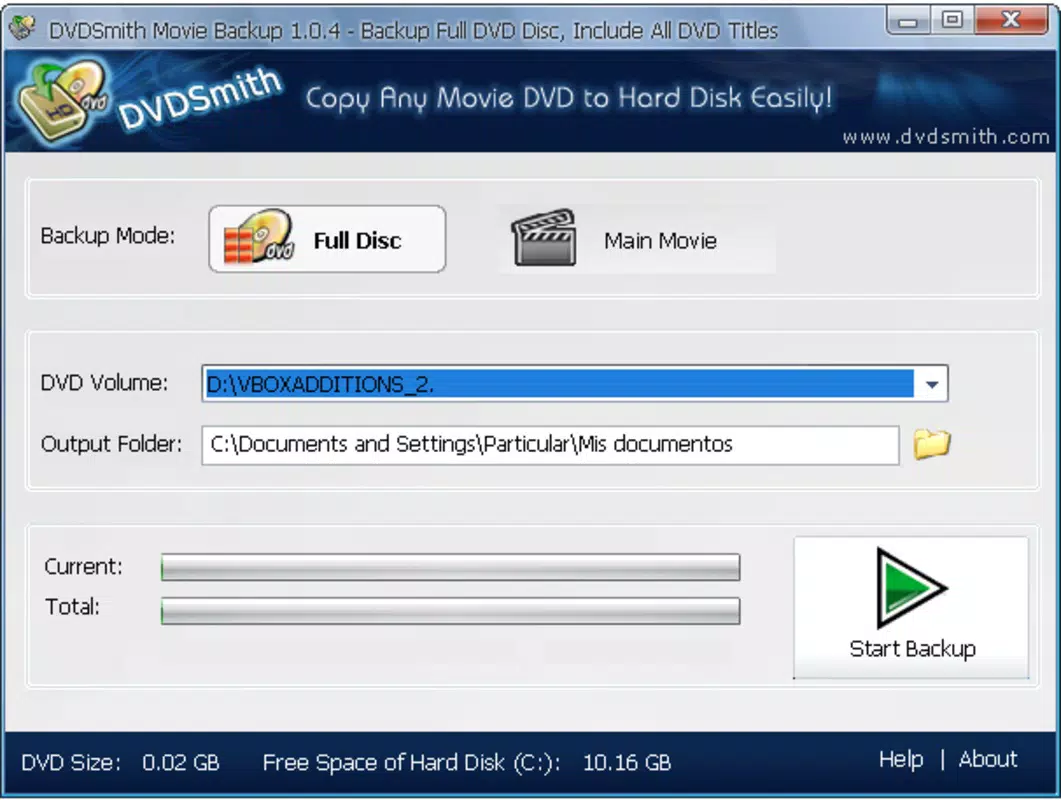
- Full Disc Copying: The app allows users to create an exact replica of a DVD, preserving the original file structure and navigation menus. This ensures that the digital copy maintains the same quality and layout as the physical disc, ideal for archival purposes.
- Main Movie Backup: Users can choose to extract only the primary feature of a movie, reducing storage usage while still retaining the core content. This is especially beneficial for users with limited hard drive space.
- Protection Removal: DVD Smith Movie Backup effectively bypasses standard DVD encryption protocols including CSS, RC, and Sony Arcos. This enables the copying of protected discs that would otherwise be inaccessible to standard backup tools.
- User-Friendly Interface: Designed with simplicity in mind, the app requires minimal setup. Users can select the source disc, choose the output folder, and initiate the backup process with just a few clicks, making it accessible even to non-technical users.
- Compatible Playback: Backed-up files are saved in standard formats compatible with widely used media players such as VLC Player and PowerDVD, ensuring seamless playback across various devices and operating systems.
For example, a user with a collection of 50 DVDs can use the main movie backup option to reduce their digital storage footprint while still maintaining access to their favorite films. Another user might use full disc copying to preserve the original menu system and bonus features of a special edition release. The ability to remove copy protections ensures that even older or region-locked discs can be backed up without encountering playback errors.
Interface, UX & Performance
The interface of DVD Smith Movie Backup is described as simple and intuitive, with a layout that prioritizes core functions such as disc selection, output folder configuration, and backup initiation. The visual style appears minimalistic, focusing on functionality over decorative elements, which aligns with its utility-driven purpose. Navigation is linear and straightforward, guiding users through the backup process in a step-by-step manner.
Although the developer did not list formal performance metrics, the application is designed for background processing, allowing users to continue working on other tasks during the backup. Responsiveness is expected to be stable on modern Windows systems, though specific device compatibility details were not provided. The software does not appear to require high system resources, making it suitable for use on mid-range desktops and laptops.
Stability during long backup sessions is likely optimized, given the nature of the task. However, the developer did not specify whether the app includes progress tracking, error logging, or pause/resume functionality. Despite these omissions, the overall user experience appears to be focused on reliability and ease of use, with minimal risk of crashes or data corruption during standard operations.
Platform Compatibility & Technical Requirements
DVD Smith Movie Backup is designed for the Windows operating system. The specific version of Windows required was not listed, nor were the minimum system specifications such as RAM, processor, or disk space. The file size of the application is not disclosed in the provided data.
The developer did not specify minimum OS requirements, nor did they indicate support for alternative platforms such as macOS or Linux. As such, users should assume compatibility is limited to Windows environments. The app is intended for use with physical DVD drives, meaning a functioning optical drive is required to read source discs.
While the developer did not provide information on update frequency or future development plans, the app’s release date was recorded as November 12, 2012. This suggests it may be an older tool that has not undergone recent updates. Users should exercise caution when installing software from this era, particularly regarding security and compatibility with modern Windows versions.
Pros and Cons
- Efficiently removes common DVD copy protections (CSS, RC, Sony Arcos)
- Offers both full disc and main movie backup options
- Simple, intuitive interface suitable for non-technical users
- Compatible with popular media players like VLC and PowerDVD
- Enables long-term preservation of physical DVD collections
- Released in 2012; may lack support for newer Windows versions
- No information on update frequency or developer support
- Platform limited to Windows; no macOS or Linux compatibility
- File size and system requirements not disclosed
- Requires a physical DVD drive for source disc access
FAQ
Is DVD Smith Movie Backup safe to install?
The safety of the application depends on the source from which it is downloaded. Since it removes copy protections, users should ensure they are backing up DVDs they legally own and comply with local copyright laws.
Can I use this app on Windows 10 or Windows 11?
While the app was released in 2012, it may still function on newer Windows versions. However, compatibility is not guaranteed, and users should test it on their system before relying on it for critical backups.
Does DVD Smith Movie Backup support Blu-ray discs?
No information was provided about Blu-ray support. The app is specifically designed for standard DVDs, not high-definition optical media.
What file formats are created after backup?
The app saves files in standard DVD-Video formats, which are compatible with VLC Player, PowerDVD, and other media players. Specific container formats were not disclosed.
How often should I update the software?
The developer did not specify update frequency. Given the release date, users should consider the app’s age and potential lack of support for modern security standards.
Final Thoughts
DVD Smith Movie Backup remains a functional tool for users seeking to digitize their DVD collections, particularly those who value simplicity and direct access to their content. Its ability to bypass common copy protections and offer flexible backup options makes it a practical solution for archiving movies. While the app’s age and lack of modern updates may raise concerns about compatibility and security, it still serves its core purpose effectively for Windows users with physical disc libraries.
The target audience includes collectors, home media enthusiasts, and anyone looking to preserve their film collections in a digital format. For those with older systems or a need for a no-frills backup utility, this app provides a reliable, low-overhead option. However, users should be mindful of its limitations and ensure they are using it within legal boundaries.
Download DVD Smith Movie Backup now


